Almost everyone has tried to make a to-do list. Far fewer keep using one. If you've started clean lists over and over only to abandon them a week later, the problem usually isn't your discipline — it's the way the list is built. This guide walks through how to make a to-do list you stick to, step by step, using effective to-do list tips that work whether you write on paper or use an app.
Why most to-do lists fail (the endless backlog problem)
The first to-do list you ever make feels great. You dump every task out of your head and onto the page, and there's real relief in it. The trouble starts on day three. You keep adding new items, but you only finish a handful, so the list grows faster than you clear it. Within a week it's 40 lines long and most of them carry over every single day.
At that point the list stops being a tool and becomes a source of stress — a running tally of everything you haven't done. That's the endless backlog problem, and it's why a to-do list that works has to do one thing above all: separate everything you might do someday from the small, realistic set you'll do today. Keep a master backlog by all means, but never confront it as your daily list.
Step 1: Keep today's list short and realistic
The single biggest fix is to make today's list short. Look at the hours you genuinely have available — not a fantasy day with zero interruptions — and only commit to what fits. For most people that's somewhere between three and seven tasks, and that's fine.
A short list that you finish builds momentum; a long list that you never clear erodes it. When you check off the last item before bed, you train your brain to trust the list again. That trust is the whole game. Move everything else to your backlog so it's captured but out of sight until tomorrow's planning.
Step 2: Pick your 1–3 most important tasks
Not all tasks are equal, so don't treat them equally. Before the day starts, choose your one to three Most Important Tasks — the ones that, if you did nothing else, would still make the day a win. Mark them clearly and do them first, before email and small stuff pull you away.
This is one of the most reliable effective to-do list tips because it protects you from "productive procrastination" — clearing ten tiny tasks while the one that actually matters sits untouched. In My Tasks you can flag a task as a priority or give it a category so it's visually obvious which items earn your best hours.
Step 3: Make every task specific and actionable
Vague tasks don't get done. "Taxes," "car," and "mom" aren't tasks — they're topics, and your brain stalls every time it hits one because it has to figure out what to actually do. Rewrite each item as a concrete next action with a clear finish line:
- Instead of "Taxes" → "Download last year's tax PDF and save it to the Taxes folder."
- Instead of "Car" → "Call the garage and book the 60,000 km service."
- Instead of "Gym" → "Pack gym bag tonight and go Tuesday after work."
A good test: if you can picture yourself physically doing it, it's specific enough. If you can't, it's probably a project hiding as a task — which is the next step.
Step 4: Split projects into tasks, and tasks by timeframe
Anything that takes more than one sitting is a project, not a task. "Plan the trip," "redo the website," "organize the garage" — each one needs to be broken into the individual actions that move it forward. Knowing how to organize a to-do list mostly comes down to this habit: always have a clear next step you can do in one go.
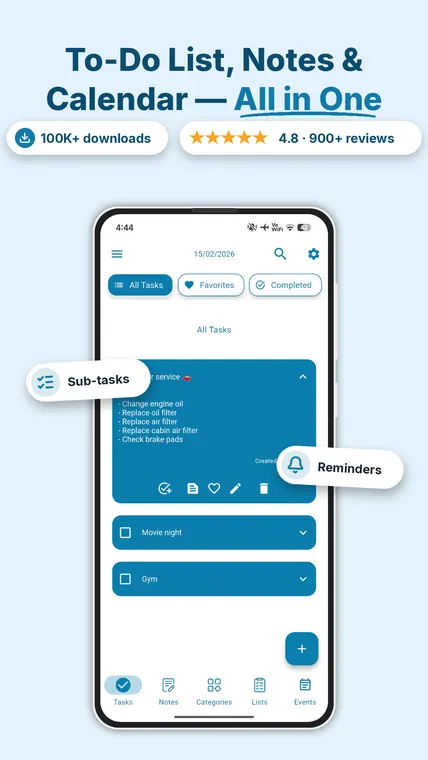
It also helps to group tasks by timeframe — today, this week, and later. That keeps today's list small while still capturing future work somewhere you trust. My Tasks supports sub-steps inside a task, so a project like "Plan trip" can hold "book flights," "reserve hotel," and "make packing list" as checkable steps under one parent — and you check off each step as you go.
Step 5: Add deadlines, reminders and recurring routines
A task without a time tends to stay undone. Give the items that matter a due date, and attach a reminder so the task surfaces at the moment it's relevant rather than relying on memory. The point of a reminder isn't pressure — it's getting the task out of your head so you can stop rehearsing it.
For anything that repeats, set it as a recurring task instead of rewriting it. "Water the plants every Tuesday," "pay rent on the 1st," "submit the report every other Friday" — recurring routines reappear on their own, so your routines run themselves and your daily to-do list ideas don't have to be reinvented each morning. This is where a good app clearly beats paper.
Step 6: Use time blocking and review daily
A list tells you what to do; time blocking tells you when. Once today's short list is set, assign rough blocks of time to your most important tasks — even loose ones like "deep work 9–11, errands after lunch." Scheduling a task makes you confront whether it actually fits the day, which is exactly the reality check an overloaded list lacks. In My Tasks, scheduled tasks show up right alongside events on the calendar so your plan and your time live in one view.
Then build a two-minute daily review. In the evening, tick off what's done, move anything unfinished to tomorrow or back to the backlog, and pick tomorrow's one to three priorities. This tiny ritual is what turns a list from a one-off burst of enthusiasm into a habit that survives the messy weeks. If you like to sketch the week on paper before it goes into an app, our free weekly planner template is a one-page starting point.
The right app makes it stick: features that build the habit
You can absolutely run this system on paper, and for some people that tactile feel is the win. But a few things are genuinely hard without an app — reminders that fire at the right time, routines that repeat automatically, and a list that's always in your pocket. Here's an honest look at where paper, a basic notes app, and a dedicated task manager land:
| Capability | Paper list | Notes app | My Tasks |
|---|---|---|---|
| Always with you | Sometimes | Yes | Yes |
| Timed reminders | No | Limited | Yes |
| Recurring tasks | Manual rewrite | No | Yes |
| Sub-steps for projects | Cramped | Basic | Yes, with progress |
| Calendar & time blocking | Separate | No | Built in |
| Share a list with others | No | Limited | Yes (premium) |
| Cost | Free | Free | Free, premium optional |
If you want a dedicated app, look for one that keeps the basics free, works offline, and doesn't force a subscription before you've decided it's worth it. My Tasks fits that brief, but it's far from the only option — if you're comparing, our roundup of the best free to-do list apps for Android weighs several side by side. Planning groceries or chores with family? A shared to-do list app lets everyone tick items off the same list in real time. And if you're coming from a paid tool, here's an honest free option you can try today before committing.
Frequently asked questions
How many things should be on a daily to-do list?
For today's list, aim for what you can realistically finish in the time you actually have — for most people that's around three to seven tasks, with one to three marked as your most important. Keep a separate backlog for everything else so today's list stays short and achievable instead of overwhelming.
Why do I keep abandoning my to-do lists?
The most common reason is that the list becomes an endless backlog. When you add everything but only finish a fraction, the list grows faster than you clear it, so it starts to feel like a list of failures. The fix is to separate a long master backlog from a short, realistic list of what you'll do today, and to write tasks as specific, doable actions.
What makes a task specific and actionable?
A specific task names a concrete physical or digital action and a clear finish line. Instead of "taxes," write "download last year's tax PDF and save it to the Taxes folder." If a task can't be done in one sitting, it's really a project — break it into smaller steps so you always know the next move.
Do reminders and recurring tasks actually help?
Yes. Reminders move tasks out of your head and trigger them at the moment they're relevant, so you don't rely on memory. Recurring tasks automate routines like "water the plants every Tuesday" or "pay rent on the 1st," so they reappear on their own and you never have to rewrite them.
What's the best way to create a to-do list?
Start with a quick brain dump, then create your actual daily list from it: pick three to seven specific tasks, phrase each one as a concrete action, give time-sensitive ones a reminder, and set anything that repeats as a recurring task. Whether you create the list on paper or in a free app, the method is the same — an app just adds reminders, repeats, and a list that's always in your pocket.